 Story Progress Saves
Windows
Cyberpunk 2077 100% Working Save File for PC
Cyberpunk 2077
cyberpunk 2077 100% working save file. Cyberpunk 2077 save file for PC: location, backup, install, load fixes.
By GameDriveX Editorial Team · Published · Updated
About this save
This is one Cyberpunk 2077 manual save: a Level 60 Street Kid with Phantom Liberty active, made on patch 2.01. Its metadata marks it as a modded save and not an end-game save, which is worth knowing before you install it.
The original listing for this file says "max level", "all endings" and "gear unlocked". The metadata does not back that up. Level 60 is the value stored, and isEndGameSave is false, which means the game itself did not mark this as a finished campaign. We cannot see gear or ending choices from the metadata.
The screenshot is a dim apartment interior. That fits a quiet moment during the story, not an ending screen, though that is only our reading of one image.
Two more things to note. The isModded: true flag means the game recorded mods when the save was made. And the build is 2.01, so we cannot say how it behaves on a newer patch.
We did not research the format used in that Store folder, so we would not copy ManualSave-1 into it.
What is inside the download
metadata.9.json(4,280 bytes)sav.dat(5,174,356 bytes)screenshot.png(167,691 bytes)- Metadata, Level: 60
- Metadata, Street Cred: 50
- Metadata, Life path: Street Kid
- Metadata, Difficulty: Very Hard
- Metadata, Phantom Liberty (EP1): Active
- Metadata, Game patch / build: 2.01 (game version 2010, save version 254)
- Metadata, Modded flag:
isModded: true - Metadata, End-game save flag:
isEndGameSave: false - Metadata, Time stamp: 17:38:50, 19.10.2023
Save location
Windows
%USERPROFILE%\Saved Games\CD Projekt Red\Cyberpunk 2077\
Steam, Epic and GOG versions.
Windows
%LOCALAPPDATA%\Packages\CDPROJEKTSA.4d0e9834-20b1-4580-9bdc-4501ef2ffaac_0xkrdv0gjmk28\SystemAppData\wgs\
Microsoft Store version. This download was not tested with it.
Folder names can differ between launchers and game versions. If the folder is missing, check the game's official support page.
1. Back up your current saves
- 1Close the game and the launcher.
- 2Press
Win + R, paste%USERPROFILE%\Saved Games\CD Projekt Red\Cyberpunk 2077and press Enter. - 3Copy the entire folder to your Desktop, named
Cyberpunk-saves-backup. If you already have aManualSave-1folder, this step matters. Copying the new one in will replace it, and we did not test renaming the folder to another number.
2. Install this save file
- 1Extract the zip.
- 2Copy the
ManualSave-1folder intoSaved Games\CD Projekt Red\Cyberpunk 2077\. - 3Accept the merge if Windows asks.
- 4Switch off cloud saves for Cyberpunk in your launcher, so the old data cannot come back.
- 5Start the game and open Load Game.
3. Check that it worked
- 1In the load list you should find a manual save with the dim apartment screenshot, Level 60 and Street Cred 50.
- 2If you see the screenshot but the game refuses to load, see the troubleshooting section below.
- 3After loading, check that your character, level and map position look right before you play on.
4. Restore your original save (undo)
- 1Delete the new
ManualSave-1folder and restore the one fromCyberpunk-saves-backup. - 2To go back to your old progress, close the game and delete the files you copied.
- 3Copy the files from your backup folder back into the save folder, then start the game.
If something goes wrong
The save is listed, but loading fails
The save was made on patch 2.01 and was flagged as modded. If your game is on a newer patch or has no mods, a failure is possible. The archive gives no mod list, so we cannot tell you what to install.
You use the Microsoft Store version
The save lives in the Microsoft Store path listed under Save location. This download is a plain folder, and we did not test it with that version.
Your old save is gone
You likely had a
ManualSave-1before. Copy it back fromCyberpunk-saves-backup.Cloud brought your previous save back
Turn off cloud saving for the game and copy the folder again.
Screenshots
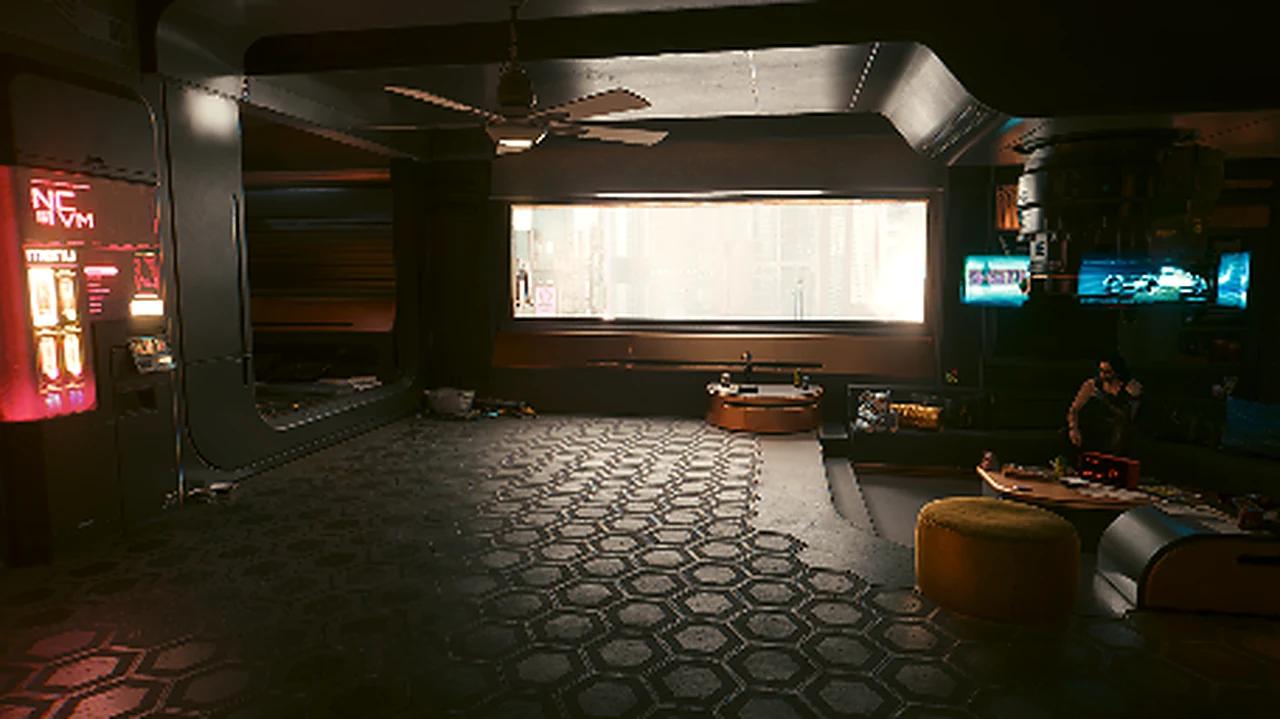
The screenshot.png stored with this save. It shows an apartment interior, not an ending.
Frequently asked questions
Does it include the Phantom Liberty expansion?
The metadata lists EP1 as active, but we did not test it.
Is it a finished game?
The flag says no.
Which ending does it have?
The file does not record that in the part we could read.
Is it a new game plus?
Not that we could see.
More game saves
View allStory Progress Saves Story Progress Saves
 Story Progress Saves
 Story Progress Saves